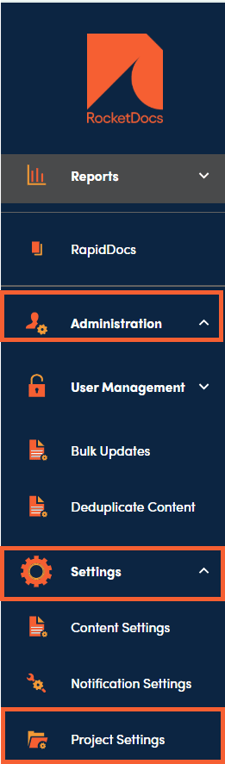
1. The Project Settings section can be found under Administration, Settings, and Project Settings.
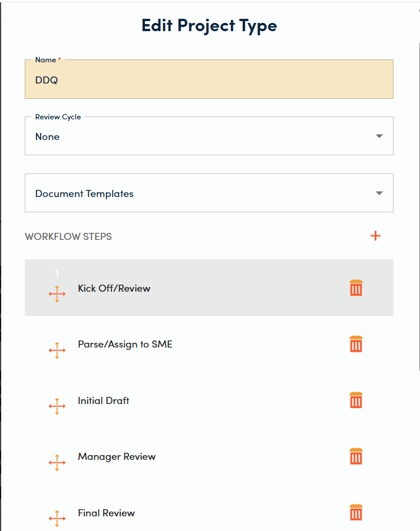
2. Click the + on the top right of the Project Types section to add a new workflow. Click on the Name of an existing workflow to edit that workflow.

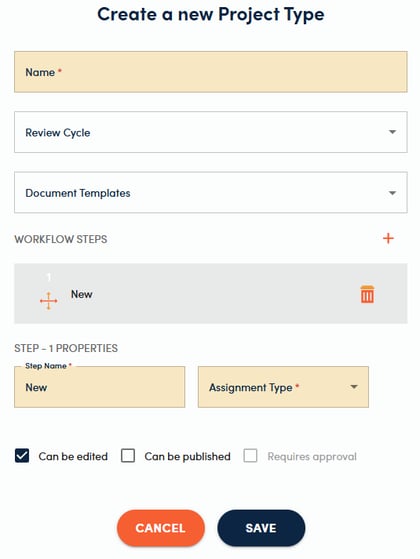
3. Enter the Name and Review Cycle (if applicable), and choose a Document Template from the dropdown list if you would like to associate one or more branded proposal templates with this workflow.
Add the appropriate Workflow Steps by clicking the + to the right of the Workflow Steps heading. Each step has several properties associated with it. You will need to enter a Step Name and choose an assignment type (user, role, or group). Then chose which user, role, or group the step should be assigned to. Choose whether the record can be edited or published and if it requires approval before moving to the next step in the workflow.
💡 Tips:
-
Review cycles can be changed from the default value for individual projects, if needed.
-
Reorder workflow steps by clicking and dragging them to move them up or down in the list.