
1. Locate a user by entering their name into the search bar in Administration, User Management, then Users.
2. Click on the line that you wish to edit, from the list of users.
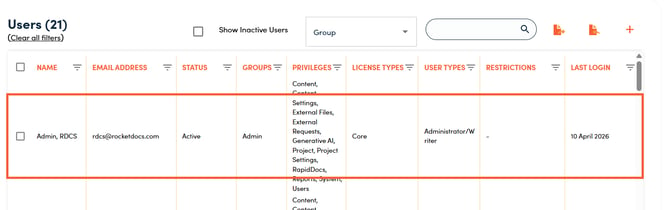
3. Edit the user’s privileges in the side drawer that opens, click Save.
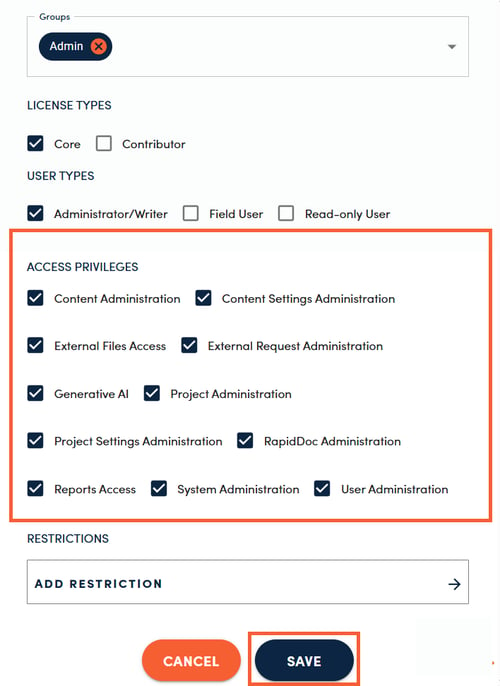
Below is the explanation of the Access Privileges options and what is included in each one.
CONTENT ADMINISTRATION
Allows users to manage content and provides overriding access to all content in the libraries visible to the user. Allowed permissions include:
- Archive, unarchive, copy, or delete one or more content records
- Bulk update attributes
- Change owner or SME on one or more content records
- Edit, approve, publish, or reassign content records outside of workflow permissions
- Relate one content record to other content record(s)
- Make quick edits to content outside of workflow (if quick edit setting is enabled in System Settings by the System Administrator)
- Initiate reviews on one or more content records
- Move content to a different library
- Change Type (workflow)
- Reset Type (restart at the beginning of the workflow)
- Revert content to a previous step in the workflow
- Update attributes and tags
📋NOTE:
Viewing permissions for content are governed by user groups that the user belongs to and the libraries each user group has access to, which are defined in Content Settings. All users will see content records where they are listed as the SME or are the Assigned To User.
CONTENT SETTINGS ADMINISTRATION
Content Settings Administration is reserved for higher level admins who need to manage the configuration of all of your RocketDocs content. Permissions include the following functions found in Administration, Settings, then Content Settings.
|
EXTERNAL FILES ACCESSAllows users to access External Files storage, typically used for files that are included as appendices in projects. |
EXTERNAL REQUEST ADMINISTRATIONAllows users to view requests sent through our Salesforce integration and convert requests into projects.
|
GENERATIVE AIGenerative AI must be enabled on your RocketDocs tenant before this option appears in user accounts or user group privileges. Enabling Generative AI will allow permissioned users to access our private generative AI capabilities.
|
PROJECT ADMINISTRATIONAllows users to manage projects and provides overriding access to all projects visible to the user. Allowed permissions include:
|
PROJECT SETTINGS ADMINISTRATIONProject Settings Administration is reserved for higher level admins who need to manage the configuration of all of your RocketDocs projects. Permissions include the following functions found in Administration → Settings → Project Settings.
|
RAPIDDOC ADMINISTRATIONAllows users to build and maintain RapidDoc templates (for RapidDocs templates that they are part of the team on) for field users to use when generating documents.
|
REPORTSAllows access to reports module in the RocketDocs. This includes built-in reports for Audit, Content, Content Usage, Logins, Projects, and RapidDocs.
|
SYSTEM SETTINGSAllows access to various system and notification settings such as email templates, notification settings, security, indexing, session timeout, and SSO configuration.
|
USER MANAGEMENTAllows users to manage (add/edit/delete/deactivate) individual user accounts/user groups and modify access privileges/restrictions. |