---
title: Add A New Excel Project
description: Select Projects on the left navigation panel. Navigate to Projects and click the + button. In the Create New Project pane on the right, a multi-step wizard…
---
[Skip to content](https://support.rocketdocs.com/en-us/knowledgebase/wiki/spaces/rdsd/pages/2960457730/addanewexcelproject#main-content)
English - United States
Show submenu for translations

Open main navigation
Close main navigation
- English - United States
Show submenu for translations
- [Contact Us](https://13knt.share-na2.hsforms.com/2arNyK8LnTriPpUcjEqzpvg)
[Contact Us](https://13knt.share-na2.hsforms.com/2arNyK8LnTriPpUcjEqzpvg)
How can we help you?
- There are no suggestions because the search field is empty.
1. [RocketDocs Knowledge Base](https://support.rocketdocs.com/en-us/knowledgebase?hsLang=en-us)
2. [Projects](https://support.rocketdocs.com/en-us/knowledgebase/projects?hsLang=en-us)
3. [Create/Edit a Project](https://support.rocketdocs.com/en-us/knowledgebase/projects?hsLang=en-us#create-edit-a-project)
# Add A New Excel Project
1\. Select Projects on the left navigation panel.
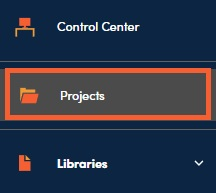
2\. Navigate to Projects and click the **+** button.

3\. In the Create New Project pane on the right, a multi-step wizard will be displayed. Fill in the fields associated with the project. Mandatory fields are shown with an asterisk **\*** and highlighted in yellow.

---
#### **📋Tips:**
- The Project Type field refers to your predefined approval workflow. Refer to the administration training materials for more information on how to set up workflows in your site (Content Setting Administrator access is required to do this).
- Review Cycles are typically used for recurring questionnaires such as DDQs.
---
4\. Click ‘Choose File’ to browse or drag and drop the document to select it. Click NEXT.

### Options when creating a new project:
- #### Generative AI Folder Selector
- Select any information, in addition to your Libraries, that you would like RocketDocs to use in generating responses. Content Administrators can create these folders and use them for uploading things like previously completed questionnaires, policies and procedures, marketing collateral, etc. Only information in folders that are selected will be used to generate responses.
- #### Autofill Confidence
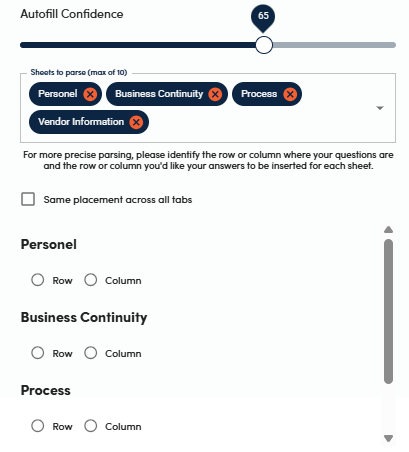
- The slider allows you to select the minimum score necessary for a response from your Libraries to be autofilled. Moving the slider closer to 100 will yield fewer autofilled responses, while moving the slider closer to 0 will result in more autofilled responses. Keep in mind that the fewer responses are autofilled, the more responses will be generated by AI.
- #### Answer Style
- Allows you to choose the formatting of the plain text responses that will be inserted into the document.
- #### Sheets to Parse (In Excel Documents)
- Use this drop-down to select which tabs of the document you would like RocketDocs to complete.
This field can be skipped if the entire file needs to be completed (for example, there are no instructional tabs or tabs where you would not expect to find information for in RocketDocs) and if the question and response placement is straightforward.
Selecting sheets to parse will enable you to tell the system where it should find the questions and where it should place responses. You can select this for each tab, or you can select it for one sheet and select the Same Placement Across All Tabs to use the selected location for all the sheets in the spreadsheets.
- #### Generative AI
- Allows the use of generative AI. The information in your Libraries and GenAI Folder Upload Module (if you elect to) will be used to generate responses to questions that were not able to be answered directly from your Libraries.
- #### Content Filters
- Help to narrow the subset of content that you would like the system to use in responding to the document. You can select libraries that you would like RocketDocs to use and add filters for up to 3 additional attributes. By default, RocketDocs will use all the information that the logged in user has been granted access to. In other words, selecting no libraries or filters will enable RocketDocs to use the entire knowledgebase that is visible to the logged in user.
- #### Custom Prompt
- This is a way for you to guide the Generative AI regarding preferred response tone, length, etc. For help with generating a helpful prompt see our article on [AI Prompts](https://app-na2.hubspot.com/knowledge-article/1846361/editor/375820941043/content?redirectUrl=%2Fknowledge%2F1846361%2F370283836093%2Farticles%2Fstate%2Fall).
- #### AutoFill
- Enables RocketDocs to use the content in your Libraries to fill in responses to the questions in your document.
- #### Mark Questions
- Enables RocketDocs to identify questions in your document.

5\. Team members should be people that will be working on the RFP but should not include SMEs. Users added here will typically receive a notification that they have been added as part of the project team (unless this notification is disabled in Notification Settings).

6\. Click on the Project Summary Page hyperlink.

7\. Click on the AI button next to the uploaded document to follow along with the autofill progress and to see the result once the questionnaire draft has been completed.

8\. Once the question identification/autofill/generative AI process has finished, click on the Download icon next to your project document to work on the questionnaire in the desk-top version of Excel or on the Excel icon to work on it in the web version of Excel. The web version of Excel allows for coauthoring (multiple writers working in a project document at the same time).

9\. Click on the RocketDocs icon in the top right corner of your screen to log into the LaunchPad. Contact your RocketDocs administrator if the icon is not available.

- [Training and FAQs](https://support.rocketdocs.com/en-us/knowledgebase/training-and-faqs?hsLang=en-us#main-content)
- [Administration Training](https://support.rocketdocs.com/en-us/knowledgebase/training-and-faqs?hsLang=en-us#administration-training)
- [Content Training](https://support.rocketdocs.com/en-us/knowledgebase/training-and-faqs?hsLang=en-us#content-training)
- [Project Training](https://support.rocketdocs.com/en-us/knowledgebase/training-and-faqs?hsLang=en-us#project-training)
- [SME and Contributor Training](https://support.rocketdocs.com/en-us/knowledgebase/training-and-faqs?hsLang=en-us#sme-and-contributor-training)
- [FAQs](https://support.rocketdocs.com/en-us/knowledgebase/training-and-faqs?hsLang=en-us#faqs)
- [Integrations and Tools](https://support.rocketdocs.com/en-us/knowledgebase/integrations-and-tools?hsLang=en-us#main-content)
- [API Integration](https://support.rocketdocs.com/en-us/knowledgebase/integrations-and-tools?hsLang=en-us#api-integration)
- [Door Integration](https://support.rocketdocs.com/en-us/knowledgebase/integrations-and-tools?hsLang=en-us#door-integration)
- [Dynamics Integration](https://support.rocketdocs.com/en-us/knowledgebase/integrations-and-tools?hsLang=en-us#dynamics-integration)
- [Google G-Suite Integration](https://support.rocketdocs.com/en-us/knowledgebase/integrations-and-tools?hsLang=en-us#google-g-suite-integration)
- [LaunchPad (Microsoft Office Add-in)](https://support.rocketdocs.com/en-us/knowledgebase/integrations-and-tools?hsLang=en-us#launchpad-microsoft-office-add-in)
- [RocketVault (Browser Extension for Portals)](https://support.rocketdocs.com/en-us/knowledgebase/integrations-and-tools?hsLang=en-us#rocketvault-browser-extension-for-portals)
- [Salesforce Integration](https://support.rocketdocs.com/en-us/knowledgebase/integrations-and-tools?hsLang=en-us#salesforce-integration)
- [SharePoint Integration](https://support.rocketdocs.com/en-us/knowledgebase/integrations-and-tools?hsLang=en-us#sharepoint-integration)
- [Single Sign-on and SCIM Provisioning](https://support.rocketdocs.com/en-us/knowledgebase/integrations-and-tools?hsLang=en-us#single-sign-on-and-scim-provisioning)
- [Teams Integration](https://support.rocketdocs.com/en-us/knowledgebase/integrations-and-tools?hsLang=en-us#teams-integration)
- [AI Capabilities](https://support.rocketdocs.com/en-us/knowledgebase/ai-capabilities?hsLang=en-us#main-content)
- [The RocketDocs AI Approach](https://support.rocketdocs.com/en-us/knowledgebase/ai-capabilities?hsLang=en-us#the-rocketdocs-ai-approach)
- [AI Prompting](https://support.rocketdocs.com/en-us/knowledgebase/ai-capabilities?hsLang=en-us#ai-prompting)
- [Astro (AI Chat Bot)](https://support.rocketdocs.com/en-us/knowledgebase/ai-capabilities?hsLang=en-us#astro-ai-chat-bot)
- [GenAI Folders](https://support.rocketdocs.com/en-us/knowledgebase/ai-capabilities?hsLang=en-us#genai-folders)
- [Administration](https://support.rocketdocs.com/en-us/knowledgebase/administration?hsLang=en-us#main-content)
- [Content Styles](https://support.rocketdocs.com/en-us/knowledgebase/administration?hsLang=en-us#content-styles)
- [Notifications](https://support.rocketdocs.com/en-us/knowledgebase/administration?hsLang=en-us#notifications)
- [System Settings](https://support.rocketdocs.com/en-us/knowledgebase/administration?hsLang=en-us#system-settings)
- [User Management](https://support.rocketdocs.com/en-us/knowledgebase/administration?hsLang=en-us#user-management)
- [Content Management](https://support.rocketdocs.com/en-us/knowledgebase/content-management?hsLang=en-us#main-content)
- [Adding and Editing Content](https://support.rocketdocs.com/en-us/knowledgebase/content-management?hsLang=en-us#adding-and-editing-content)
- [Archiving Content](https://support.rocketdocs.com/en-us/knowledgebase/content-management?hsLang=en-us#archiving-content)
- [Content Administration Settings](https://support.rocketdocs.com/en-us/knowledgebase/content-management?hsLang=en-us#content-administration-settings)
- [Content Import/ Export](https://support.rocketdocs.com/en-us/knowledgebase/content-management?hsLang=en-us#content-import-export)
- [Content Libraries & Attributes (Categorization)](https://support.rocketdocs.com/en-us/knowledgebase/content-management?hsLang=en-us#content-libraries-attributes-categorization)
- [Deduplicating Content](https://support.rocketdocs.com/en-us/knowledgebase/content-management?hsLang=en-us#deduplicating-content)
- [External Files](https://support.rocketdocs.com/en-us/knowledgebase/content-management?hsLang=en-us#external-files)
- [Searching for Content](https://support.rocketdocs.com/en-us/knowledgebase/content-management?hsLang=en-us#searching-for-content)
- [Projects](https://support.rocketdocs.com/en-us/knowledgebase/projects?hsLang=en-us#main-content)
- [Project Administration Settings](https://support.rocketdocs.com/en-us/knowledgebase/projects?hsLang=en-us#project-administration-settings)
- [Autofill & LaunchPad](https://support.rocketdocs.com/en-us/knowledgebase/projects?hsLang=en-us#autofill-launchpad)
- [Create/Edit a Project](https://support.rocketdocs.com/en-us/knowledgebase/projects?hsLang=en-us#create-edit-a-project)
- [Project Integrations](https://support.rocketdocs.com/en-us/knowledgebase/projects?hsLang=en-us#project-integrations)
- [Project Navigation](https://support.rocketdocs.com/en-us/knowledgebase/projects?hsLang=en-us#project-navigation)
- [RapidDocs](https://support.rocketdocs.com/en-us/knowledgebase/rapiddocs?hsLang=en-us)
- [Reports](https://support.rocketdocs.com/en-us/knowledgebase/reports?hsLang=en-us)
- [Technical Documentation](https://support.rocketdocs.com/en-us/knowledgebase/technical-documentation?hsLang=en-us)
- [Release Updates](https://support.rocketdocs.com/en-us/knowledgebase/release-updates?hsLang=en-us#main-content)
- [2026 Release Notes](https://support.rocketdocs.com/en-us/knowledgebase/release-updates?hsLang=en-us#2026-release-notes)
- [2025 Release Notes](https://support.rocketdocs.com/en-us/knowledgebase/release-updates?hsLang=en-us#2025-release-notes)
- [2024 Release Notes](https://support.rocketdocs.com/en-us/knowledgebase/release-updates?hsLang=en-us#2024-release-notes)
- [2023 Release Notes](https://support.rocketdocs.com/en-us/knowledgebase/release-updates?hsLang=en-us#2023-release-notes)
[mailto:email@email.com](mailto:email@email.com)
Copyright © 2026, RocketDocs Global